MCP vs A2A in 2026: How to Build AI Agent Automation That Converts
 ·
· 
MCP vs A2A in 2026: How to Build AI Agent Automation That Converts
Quick answer: MCP connects an AI agent to tools and data, while A2A helps one agent discover and communicate with another. A practical 2026 automation stack uses both, but keeps the workflow measurable: trigger, retrieve context, make a decision, request approval when needed, publish, and measure the business result.
Most AI automation projects do not fail because the model cannot write. They fail because the system cannot reliably access the right information, hand work to the right specialist, or prove that the final action created value. That matters whether you are a creator publishing SEO articles, an ecommerce operator answering product questions, or a small business turning leads into sales. I build content and automation systems around this exact problem, so this guide focuses on the part that makes agentic AI useful in production: the architecture between the prompt and the outcome.
What is the difference between MCP and A2A?
MCP connects an AI application to external tools, data sources, and workflows, while A2A standardizes communication between separate agents. Anthropic describes MCP as an open standard for connecting AI applications to systems such as files, databases, search tools, and specialized workflows.1 Google’s developer guidance describes A2A as a way for agents to discover and communicate with remote agents through capabilities and endpoints described in an Agent Card.2
A simple analogy helps. MCP is the agent’s access layer: it can read a knowledge base, query a database, search the web, or call a publishing tool. A2A is the collaboration layer: a research agent can hand a verified brief to a writing agent, which can hand a draft to an editor, which can request approval from a publishing agent. Your workflow platform remains the control layer that decides when each step runs.
Why are AI agents becoming a serious automation opportunity in 2026?
AI agents are moving from isolated chat responses toward managed systems that can perform longer, multi-step work. OpenAI’s Frontier announcement positions agent deployment around shared context, onboarding, permissions, and governance rather than generation alone.3 Google’s practical protocol guide demonstrates a multi-step agent that checks inventory, consults remote specialists, executes transactions, and renders a result.2
This shift creates a better opportunity for small teams. You do not need to build a giant autonomous company on day one. You can start with one revenue-linked workflow, such as turning a verified industry update into a useful article, attaching a relevant product recommendation, publishing to GitHub, and recording the outcome. The advantage comes from dependable handoffs, not from giving an agent unlimited authority.
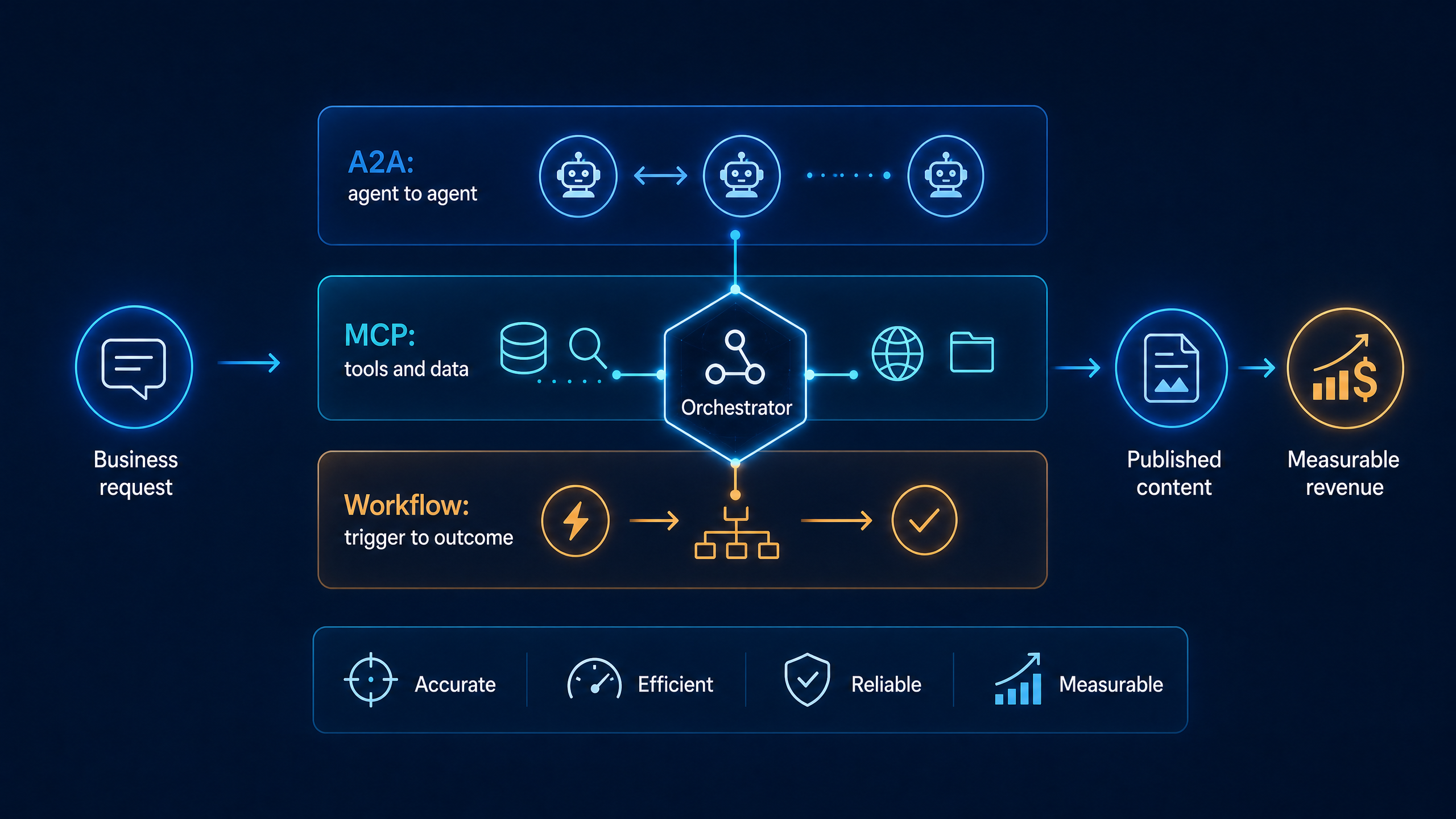
Which layer should handle each part of an AI content workflow?
Use the workflow layer for timing and rules, MCP for controlled access, A2A for specialist handoffs, and a human checkpoint for high-risk publication decisions. This separation makes failures easier to diagnose because every layer has a specific job.
| Layer | Main responsibility | Example in a content business | Success signal |
|---|---|---|---|
| Trigger and workflow | Starts work and enforces sequence | RSS item, form submission, or scheduled research run | Correct item enters the queue |
| MCP connection | Supplies tools and trusted context | Search, analytics, product catalog, CMS, or GitHub | Agent receives valid structured data |
| A2A handoff | Routes work to a specialist agent | Research agent sends brief to writer or editor | Handoff includes status and artifacts |
| Quality gate | Tests factuality, format, and policy | Citation check, duplicate check, frontmatter validation | Draft passes defined checks |
| Publishing action | Writes to the chosen channel | Commit Markdown to the blog repository | Build starts and URL resolves |
| Measurement | Connects content to business value | Search impressions, clicks, product visits, sales | Conversion data improves the next brief |
The key is to avoid calling every API directly from a single prompt. If your writing agent can both invent a topic and publish without a reviewable artifact, a bad input can travel through the whole system before anyone notices.
How do MCP tools improve content quality and conversion rates?
MCP improves the agent’s access to current context, but conversion still depends on the quality of the sources, offer, and measurement loop. A tool connection can let an agent read your product catalog, inspect previous articles, retrieve search data, and use a controlled publishing action. It does not automatically make an article accurate or persuasive.
For a practical content pipeline, give the research agent a narrow task: identify a question with clear buyer intent, collect two or three authoritative sources, and return a structured brief containing the audience, pain point, evidence, recommended angle, and commercial relevance. Let the writer use that brief rather than raw search snippets. Let an editor reject unsupported claims, outdated versions, missing citations, and weak calls to action.
A conversion-oriented article should answer the reader’s question before introducing a product. The offer then becomes the logical next step. For example, a guide about building an AI content pipeline can recommend a detailed implementation resource, a template, or a service only after showing the reader how to evaluate triggers, tool access, approval rules, and measurement.
When should two AI agents communicate with A2A?
Use A2A when separate agents have different responsibilities, tools, permissions, or deployment lifecycles. A research agent may need browsing and source evaluation. A publishing agent may need repository access but should not be allowed to rewrite research evidence. A sales agent may need product and CRM data but should not have permission to edit the public blog.
A good handoff includes the task ID, objective, source URLs, structured findings, confidence or review status, requested output, and a clear completion signal. Google’s guide describes Agent Cards as a discovery mechanism that exposes an agent’s name, capabilities, and endpoint.2 In your own system, treat that metadata as a contract: if the receiving agent cannot satisfy the requested capability, the workflow should stop or route to a fallback rather than silently improvise.
Do not add A2A merely because it sounds advanced. If one Make.com scenario can complete a small deterministic task with clear error handling, a direct module call may be simpler. Add a second agent when the division of responsibility reduces risk or makes the system easier to scale.
How can you build a reliable AI-agent publishing workflow?
Build the smallest observable workflow that can produce one useful, verified, and measurable article. Use this sequence before adding more platforms or autonomous actions:
- Choose one audience and one commercial question. Examples include how to select an AI automation platform, how to connect an agent to a product catalog, or how to measure content-assisted conversions.
- Capture a source item and normalize it. Store the title, URL, source date, publisher, and a stable identifier so the same item is not processed twice.
- Ask a research agent for a structured brief. Require source-backed claims, a search-intent label, a reader pain point, and a realistic product or next-step match.
- Use MCP-enabled tools for context. Retrieve approved brand guidance, product facts, internal links, and prior article titles before drafting.
- Create the article with a quality gate. Check frontmatter, word count, headings, links, citations, image paths, and unsupported claims before publication.
- Publish only the approved artifact. Commit a URL-safe Markdown filename to the correct branch and verify that the build system accepts the file.
- Measure the complete funnel. Track impressions, clicks, engaged sessions, product-page visits, email signups, and sales rather than page views alone.
This structure also makes Make.com troubleshooting easier. If no article appears, you can ask whether the trigger saw a new item, whether the research step returned a brief, whether the quality gate rejected the draft, whether GitHub accepted the commit, or whether the site build failed.
What should you automate first if you run a small business?
Automate repetitive information movement before automating irreversible decisions. Start with research collection, content briefs, internal-link suggestions, product matching, metadata generation, and publishing notifications. Keep final approval for medical, legal, financial, payment, customer-account, and reputation-sensitive actions.
For a creator or small ecommerce brand, a strong first workflow can monitor a narrow topic, create a source-backed article brief, draft an answer-led post, attach one relevant product or lead magnet, publish after validation, and send a Telegram summary with the article URL and checks performed. The system earns trust because each run leaves an audit trail.
Security is part of conversion. Use least-privilege credentials, keep tokens out of prompts and public logs, separate read and write permissions, and rotate keys when they may have been exposed. A workflow that publishes frequently but leaks credentials is not an automation success.
Is MCP or A2A better for a Make.com content pipeline?
Neither is universally better: Make.com is often the orchestration layer, MCP is the tool-and-context layer, and A2A is the collaboration layer. For a compact pipeline, Make.com can trigger the workflow, call a research service, validate the result, publish to GitHub, and notify you. MCP becomes useful when the agent must use multiple standardized tools. A2A becomes useful when specialist agents need to discover and hand work to one another.
The best architecture is the one that makes the next failure obvious. If a system cannot tell you which source was used, which agent made a decision, which validation failed, and which action was taken, it is not ready for unrestricted autonomy.
Frequently asked questions
Does MCP replace APIs?
No. MCP provides a standardized way for an AI application to discover and use tools or data sources. The underlying service may still use an API, database, file system, or another integration method.
Does A2A make agents fully autonomous?
No. A2A standardizes discovery and communication, but you still need authentication, permissions, validation, observability, and human approval rules. Protocols make collaboration easier; they do not remove operational responsibility.
Can I use these ideas without coding?
Yes. You can apply the same separation of trigger, context, specialist task, quality gate, publishing action, and measurement using Make.com modules and controlled HTTP calls. Coding becomes more useful when you need custom agent discovery, complex state, or stricter permissions.
What is the best first KPI for an AI content workflow?
Start with a measurable downstream action, such as qualified product-page visits or email signups, while monitoring search impressions and engaged sessions as supporting indicators. A high article count is not proof that the workflow is creating business value.
The practical next step is to turn this architecture into a reusable content-and-automation playbook for your own niche, with prompts, validation checks, and publishing templates. You can find the deeper implementation resource in the AEO Masterguide.